
10-Bit vs 8-Bit Video: Does It Actually Matter?
You may have heard that professional cameras should shoot 10-bit 4:2:2. And you may have wondered:
“What does any of that actually mean?”
Let’s fix that.
8-bit vs 10-bit
The “bit” number describes how many levels of tonal information each color channel can represent.
- 8-bit gives you 256 levels per channel
- 10-bit gives you 1,024 levels per channel
That might not sound like a huge difference. It is.
Across RGB, the theoretical number of possible color combinations goes from roughly 16.7 million at 8-bit to more than 1 billion at 10-bit.
That’s a lot more information.
Why does that matter?
Because color grading is basically asking your footage to do things it wasn’t necessarily designed to do.
You might:
- Increase exposure
- Recover shadows
- Push highlights
- Change skin tones
- Add contrast
- Change saturation
- Apply a LUT
- Transform LOG footage
The more tonal information you start with, the more room you generally have before the image starts falling apart.
This is one reason 10-bit is so valuable for LOG recording.
What is 4:2:2?
Now we get to chroma subsampling. Video contains two broad types of information:
- Luminance — brightness/detail
- Chroma — color information
4:2:2 reduces the amount of color information recorded compared with luminance while keeping a lot of useful image detail. You don’t need to memorize the math. Just understand:
- 4:2:2 preserves more color information than 4:2:0.
That can be especially useful when keying, grading, or heavily manipulating color.
Is 4:2:2 twice as good as 4:2:0?
No. This isn’t horsepower. You don’t get “double the image quality.” It’s about how the camera samples and stores color information. And whether you notice the difference depends heavily on what you’re doing with the footage.
Does 10-bit matter for social media?
Sometimes. If you’re shooting a quick talking-head video, doing minimal grading, and uploading to Instagram, you probably aren’t going to sit there thinking:
- “Wow. Incredible 10-bit.”
But if you’re shooting LOG, heavily grading the footage, dealing with difficult lighting, or trying to preserve smooth gradients, 10-bit becomes much more valuable.
Banding is the enemy
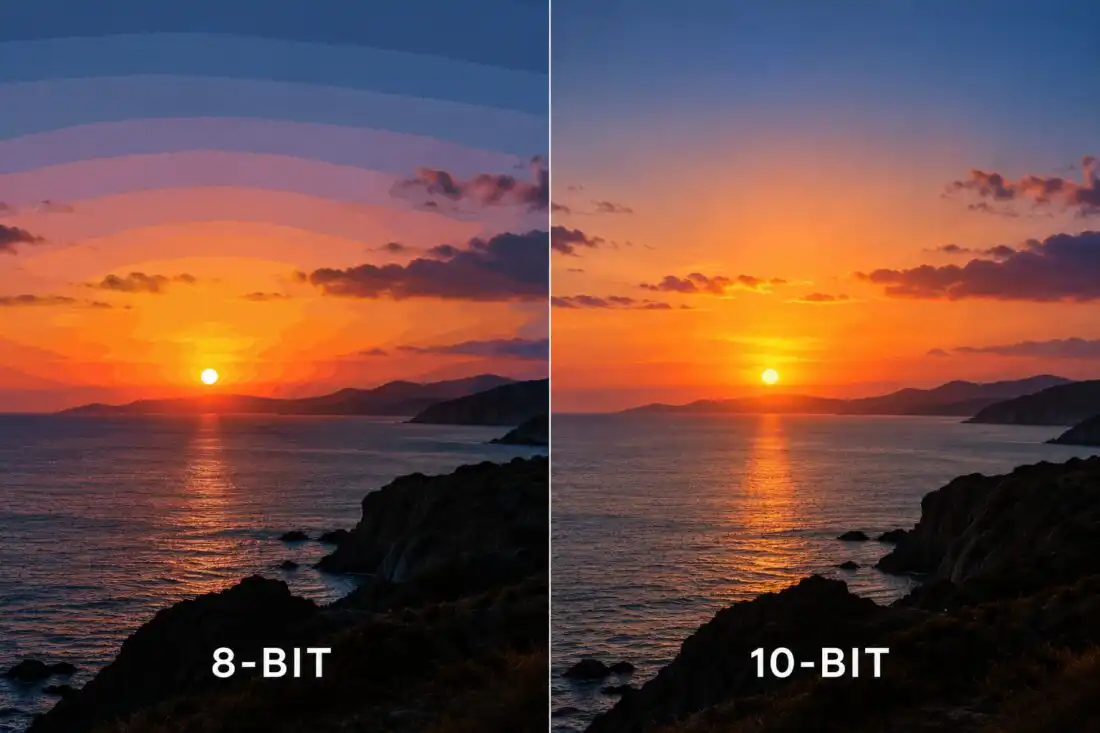
One place you’ll notice bit depth is in gradients. Think about a blue sky. In an ideal image, the sky transitions smoothly from one shade to another. With insufficient tonal information, those transitions can show up as visible bands. That’s called banding.
10-bit gives you dramatically more tonal steps to work with, making smooth gradients easier to preserve.
So should you always shoot 10-bit 4:2:2?
If your camera supports it and your workflow can handle the files, then yes. I ALWAYS do. So for professional production, yes. But don’t obsess over the specification. A beautifully shot 8-bit image can still look great. A badly shot 10-bit image is still badly shot. And 10-bit doesn’t magically give you more dynamic range. It’s simply giving you more precision in the recorded image.
The practical takeaway
If you’re shooting:
LOG + professional color grading + difficult lighting
10-bit is extremely valuable.
If you’re shooting:
Quick social content + no grading + fast turnaround
8-bit may be perfectly adequate.
But for professional cinema cameras?
10-bit 4:2:2 has become a very sensible baseline. And that’s what we consider it to be: a baseline. When shooting RAW, you typically shoot 12-bit 4444 … imagine the possibilities. And the media storage needs!
Overall, shooting at least 10-bit 4:2:2 is one of those features you may not notice when everything goes right.
But you’ll be very happy it’s there when you need to push the image.
And that’s kind of the point.