
Should I Shoot LOG Video? S-Log vs. C-Log Explained
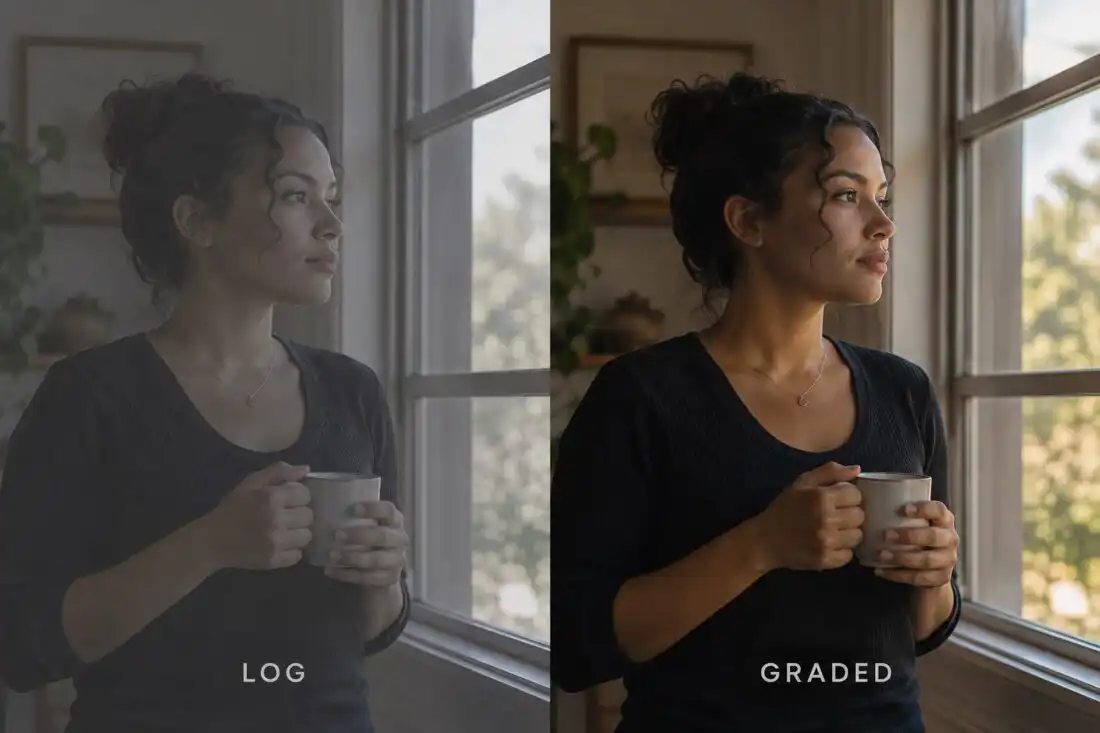
If you’ve ever looked at footage straight out of a professional cinema camera and thought, “Why does this look terrible?” then congratulations. You probably just discovered LOG video.
LOG video often looks flat, gray, low-contrast and slightly depressing. And that’s intentional.
So What Is LOG Video?
LOG, short for logarithmic gamma, is a way of encoding the brightness information captured by the camera. Encoding is simply how the camera turns what the sensor sees into the data saved in the file. Gamma is the curve that decides how each level of brightness gets stored.
Instead of making the footage look pleasing right away, LOG is designed to preserve more usable information across the image. That’s particularly true in the highlights and shadows. Highlights are the brightest parts of the frame, and shadows are the darkest parts.
The result is footage that generally looks flat and washed out straight out of camera. That’s not a finished image. It’s a starting point, meant to be shaped later in post-production.
Why Shoot LOG?
Because it gives you more flexibility in post-production. Post-production is everything that happens after the shoot, and it’s where LOG video gets color graded. Color grading is where the contrast, color and brightness of the footage get adjusted to create the final look.
A Bright Window Behind Your Subject
Imagine you’re filming someone standing inside a room with a bright window behind them. You have very bright highlights outside and relatively dark shadows inside. The camera has to hold on to both at the same time.
A conventional picture profile may push the image toward a finished-looking contrast curve. A picture profile is the camera setting that shapes how the image looks as it’s recorded. That kind of curve makes the image look punchy right away. The trade-off is less detail to work with at the brightest and darkest ends.
LOG gives you more room to manipulate the image later. In the window example, that means more detail to work with in both the bright window and the darker room. That’s especially useful for professional productions where the footage will be color graded.
S-Log3
S-Log3 is Sony’s logarithmic gamma curve, designed for professional acquisition and grading. Acquisition is simply the capture stage, when the footage is being recorded. It’s found across cameras including Sony’s Cinema Line, the company’s family of cinema cameras.
The Sony FX6, for example, is rated by Sony at 15+ stops of latitude when shooting S-Log3. Latitude describes how wide a range of brightness the camera can record with detail, from deep shadows to bright highlights. Stops are the standard steps used to measure that range.
S-Log3 is designed to work well with Sony’s color management and grading workflows, including Sony’s S-Gamut3 and S-Gamut3.Cine color spaces. A color space defines the range of colors a recording can describe. Color management keeps those colors consistent from the camera through to the final grade.
Canon Log
Canon has its own LOG systems, including Canon Log 2 and Canon Log 3. C-Log2 is particularly designed to maximize dynamic range for grading. Dynamic range is the span of detail a camera can capture, from the darkest shadows to the brightest highlights.
C-Log3 is generally considered a little more forgiving and easier to work with, while still providing substantial dynamic range. In practice, the choice comes down to whether you want the most range for the grade or an easier starting point. Canon’s Cinema EOS cameras, such as the C500 Mark II and C300 Mark III, support Canon Log 2 and Canon Log 3.
Is S-Log Better Than C-Log?
No. This is one of those questions where the internet wants you to pick a winner. You don’t have to.
S-Log and C-Log are simply different manufacturers’ approaches to logarithmic recording. Both do the same basic job of holding on to highlight and shadow information for the grade. And both can produce excellent results.
What Matters More
What matters more is exposure, white balance, color space and monitoring. Exposure is how bright you record the image. White balance makes whites look white under the light you’re shooting in. Monitoring is how you view the image while you shoot.
Lighting matters too, along with the camera’s sensor. So does the colorist, who is the person grading your footage. Your post-production workflow, meaning the steps the footage goes through after the shoot, matters as well.
A beautifully exposed C-Log image can look incredible. So can S-Log3. A badly exposed image can look terrible in either.
LOG Is Not the Same Thing as RAW
This is another common misunderstanding. LOG is a gamma encoding, which means it changes how brightness is stored. RAW is a recording approach that preserves much more of the sensor’s original image data. That data is kept before many of the camera’s processing decisions are baked into the recording.
Processing decisions are the adjustments a camera makes to turn sensor data into a viewable image. With LOG, the camera still makes those decisions, then records the result with a flat curve.
You can shoot LOG without RAW. You can shoot RAW. And many cameras can do both.
You Need to Expose LOG Correctly
One of the biggest mistakes people make is thinking, “LOG gives me more dynamic range, so I can just expose however I want.” Nope. The LOG video still needs to be properly exposed.
More dynamic range gives you more room in the grade, but it doesn’t rescue a badly exposed shot. If you record too dark, lifting the shadows later can bring out noise. If you record too bright, highlights pushed past what the camera can hold are gone for good.
Use Your Exposure Tools
Some cameras benefit from specific exposure practices when shooting LOG, and your camera’s recommended exposure tools are your friends. Those include the waveform, false color, zebras, a light meter and more.
A waveform is a graph that shows the brightness levels across your frame. False color paints the image in colors that stand for different exposure levels. Zebras draw striped patterns over areas that reach a brightness you set, and a light meter measures the light itself.
Don’t judge LOG exposure purely from the flat-looking LCD image. Because LOG looks washed out, the screen can make it hard to tell whether your exposure is right. Use a LUT (look-up table) in camera to see how the final image may look. A LUT converts the flat LOG picture into a more normal-looking preview while you shoot.
Should Everyone Shoot LOG Video?
No, and this is important. If you’re shooting a quick social video that needs to be turned around immediately, LOG may be unnecessary. LOG footage needs a grade before it looks finished, and a fast turnaround may not leave time for one.
If you’re shooting a professional commercial, documentary or narrative project, or anything that will receive a proper grade, LOG can be extremely useful. A proper grade is where the extra highlight and shadow information finally pays off.
But don’t shoot LOG video simply because someone on YouTube told you professional filmmakers use LOG. Use it when your workflow actually benefits from it. That usually means there’s time and a plan to grade the footage after the shoot.
And remember: the goal isn’t to make the flattest-looking footage possible. The goal is to make the best-looking finished image possible.
Let’s Make Something
We use the cameras we rent on real productions, so we can help you figure out what your shoot actually needs, and just as importantly, what it doesn’t. Our camera and equipment rentals are available individually or packaged around your shoot, and we can add experienced camera operators, DPs and ACs when you need people as well as gear. If you want a team to take the project from planning through post, our video production services cover that too.
From shaping the story before you shoot to the final cut, our production services are built around your project, and our work spans documentaries, commercials and branded content. Agape Media Group is a small, owner-led production company based in South Florida, so you work directly with the people responsible for your project. Tell us what you’re shooting, request a quote or call 954-249-0702, and we’ll help you build the right package.